SI
Intermediate light switch plan mark
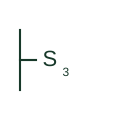
Plan mark for an intermediate switch inserted between two two-way switches to add a third control point.
IEC
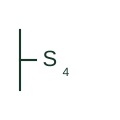
US plan symbol S4 for a four-way switch placed between two three-way switches to add control points.
In plain English
The S4 symbol marks a four-way switch, which crosses the travellers between two three-way switches. Any number of S4 switches can be added along the travellers, so long corridors and rooms with several entries show S3 at the ends and S4 between.
Reading the plan, the installer checks that S4 never appears without a pair of S3 switches on the same group. The IEC equivalent is the intermediate switch.
The symbol gives no information about the device rating or style. Smart switching systems may replace this wiring scheme with a master and companion device, which should be noted.
US plan symbol S4 for a four-way switch placed between two three-way switches to add control points. S3 changes over; S4 crosses two travellers and only works between S3 switches.
Read the source: IEEE/ANSI 315-1975: graphic symbols for electrical and electronics diagrams
US architectural electrical plan practice in the ANSI Y32.9 lineage, read alongside IEEE 315 context; independently drawn, not a certified IEEE or ANSI graphic.
Shown as an independently authored educational illustration. Use the cited publication and drawing legend to verify the required drafting form.
The S4 symbol marks a four-way switch, which crosses the travellers between two three-way switches. Any number of S4 switches can be added along the travellers, so long corridors and rooms with several entries show S3 at the ends and S4 between.
Reading the plan, the installer checks that S4 never appears without a pair of S3 switches on the same group. The IEC equivalent is the intermediate switch.
The symbol gives no information about the device rating or style. Smart switching systems may replace this wiring scheme with a master and companion device, which should be noted.
S3 changes over; S4 crosses two travellers and only works between S3 switches.
These public references support the explanation and provide further detail. Their graphics and downloadable files remain with their publishers.
Graphic-symbol standards context; not a source of reproduced artwork.
This illustration was authored independently by Elora Grid to explain the concept. It is not reproduced from a customer drawing, an official standard graphic or a manufacturer CAD file. Its correspondence to an exact IEC or IEEE symbol identifier has not been certified.
SVG and DXF downloads contain this original artwork. DXF uses unscaled drawing units; a GA envelope supplies no product dimensions, clearances or fabrication information. Original artwork is available under CC BY 4.0. Third-party references retain their own terms.
Elora Grid helps electrical teams work with drawings, specifications and equipment information. Explore the drafting workflow or join the early-access waitlist.