RTR
Network router symbol
Network symbol for a router, a circle or box with outward arrows, that connects separate IP networks.
Schematic / GA
Network symbol for a firewall, drawn as a brick wall, separating network zones on communication drawings.
In plain English
A firewall controls traffic between network zones according to rules, and is drawn on network diagrams as a brick wall block. Industrial drawings place it between the corporate network and control networks or between a remote access link and the plant.
Many industrial routers include firewall functions, so the drawing may show the firewall as a logical function inside a router. Where a separate appliance is used, its power and rack position appear on the electrical drawing. The symbol does not show the rule set or zones. Those belong in the cyber security documentation.
Identify the zones on each side. Check whether it is a separate device or a router function. A router connects networks; a firewall filters traffic by policy, even when both are in one device.
Network symbol for a firewall, drawn as a brick wall, separating network zones on communication drawings. A router connects networks; a firewall filters traffic by policy, even when both are in one device.
Read the source: Industrial cellular routers and gateways
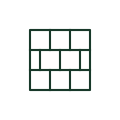
A firewall controls traffic between network zones according to rules, and is drawn on network diagrams as a brick wall block. Industrial drawings place it between the corporate network and control networks or between a remote access link and the plant.
Many industrial routers include firewall functions, so the drawing may show the firewall as a logical function inside a router. Where a separate appliance is used, its power and rack position appear on the electrical drawing. The symbol does not show the rule set or zones. Those belong in the cyber security documentation.
A router connects networks; a firewall filters traffic by policy, even when both are in one device.
These public references support the explanation and provide further detail. Their graphics and downloadable files remain with their publishers.
Public product family page describing routers and gateways, including stateful firewall functions.
This illustration was authored independently by Elora Grid to explain the concept. It is not reproduced from a customer drawing, an official standard graphic or a manufacturer CAD file. Its correspondence to an exact IEC or IEEE symbol identifier has not been certified.
SVG and DXF downloads contain this original artwork. DXF uses unscaled drawing units; a GA envelope supplies no product dimensions, clearances or fabrication information. Original artwork is available under CC BY 4.0. Third-party references retain their own terms.
Elora Grid helps electrical teams work with drawings, specifications and equipment information. Explore the drafting workflow or join the early-access waitlist.