Mm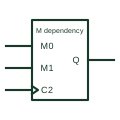
IEC mode dependency (M)
Dependency label Mm used to show operating modes; affected inputs and outputs act only in the selected mode.
IEC
IEC counter whose mode inputs select counting up with + or down with -, drawn with M dependency.
In plain English
An up/down counter is shown with a CTR additional drawing mark and a clock input labelled with both counting directions, for example 2+ and 1- under mode control. A direction input produces M1 and M2 modes, so the same clock counts up in one mode and down in the other. Load and enable functions use further dependency labels.
Typical applications include position tracking from pulse inputs, reversible totalising and digital set-point adjustment. The drawing should identify the direction source and whether direction may change while clock pulses are present.
The symbol does not indicate how overflow or underflow is signalled beyond any CT= outputs shown. Check ripple clock or max/min outputs on the device.
IEC counter whose mode inputs select counting up with + or down with -, drawn with M dependency. A single-direction CTR counter shows only + on its clock.
Read the source: Overview of IEEE Standard 91-1984: explanation of logic symbols (SDYZ001A) · SN74HC191 synchronous 4-bit up/down binary counter
Qualifying-symbol and dependency conventions as explained in TI's public overview of IEEE Std 91-1984, which incorporates IEC 617-12 work. Independent educational drawing; not certified IEC geometry or an IEC database identifier.
Shown as an independently authored educational illustration. Use the cited publication and drawing legend to verify the required drafting form.
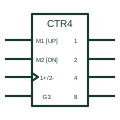
An up/down counter is shown with a CTR qualifier and a clock input labelled with both counting directions, for example 2+ and 1- under mode control. A direction input produces M1 and M2 modes, so the same clock counts up in one mode and down in the other. Load and enable functions use further dependency labels.
Typical applications include position tracking from pulse inputs, reversible totalising and digital set-point adjustment. The drawing should identify the direction source and whether direction may change while clock pulses are present.
The symbol does not indicate how overflow or underflow is signalled beyond any CT= outputs shown. Check ripple clock or max/min outputs on the device.
A single-direction CTR counter shows only + on its clock.
These public references support the explanation and provide further detail. Their graphics and downloadable files remain with their publishers.
Counting up and down inputs and M dependency.
Manufacturer up/down counter documentation.
This illustration was authored independently by Elora Grid to explain the concept. It is not reproduced from a customer drawing, an official standard graphic or a manufacturer CAD file. Its correspondence to an exact IEC or IEEE symbol identifier has not been certified.
SVG and DXF downloads contain this original artwork. DXF uses unscaled drawing units; a GA envelope supplies no product dimensions, clearances or fabrication information. Original artwork is available under CC BY 4.0. Third-party references retain their own terms.
Dependency label Mm used to show operating modes; affected inputs and outputs act only in the selected mode.
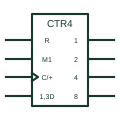
IEC counter marked CTRm, where m is the bit count and the cycle length is 2 to the power m.
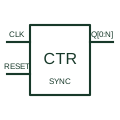
Updates its binary count from a common clock with the documented count-enable, load and clear controls.
Elora Grid helps electrical teams work with drawings, specifications and equipment information. Explore the drafting workflow or join the early-access waitlist.