PLUG SOCKET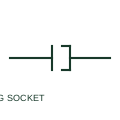
Plug and socket connector pair
A plug/socket pair represents a detachable electrical connection with two mating sides.
Schematic
A connector joining two cables without either half being mounted on equipment, such as an extension lead coupling.
In plain English
An inline coupler joins two free cables, with neither half fixed to a panel or device. Typical uses are extension leads, portable equipment feeds and sensor cables with a disconnect point partway along the run. Drawings show both halves floating on the cable line, sometimes with a note that the coupling is located in a particular area.
Because the coupler is free, its location is not fixed by the equipment, so the drawing should state where it is. The symbol does not show ingress protection, latching or whether the coupling may be separated under load. For power couplers, the live side should be the socket half so exposed pins are not supplied with operating power.
Identify which side is supplied with operating power and confirm it is the socket half. Look for a location note for the coupler. An inline coupler joins two free cables; a panel plug and socket has one half fixed to equipment.
A connector joining two cables without either half being mounted on equipment, such as an extension lead coupling. An inline coupler joins two free cables; a panel plug and socket has one half fixed to equipment.
Read the source: AutoCAD Electrical: Connectors · Autodesk IEEE Symbol Preview — Connectors - No Wirenumber Changes
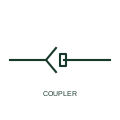
An inline coupler joins two free cables, with neither half fixed to a panel or device. Typical uses are extension leads, portable equipment feeds and sensor cables with a disconnect point partway along the run. Drawings show both halves floating on the cable line, sometimes with a note that the coupling is located in a particular area.
Because the coupler is free, its location is not fixed by the equipment, so the drawing should state where it is. The symbol does not show ingress protection, latching or whether the coupling may be separated under load. For power couplers, the live side should be the socket half so exposed pins are not energised.
An inline coupler joins two free cables; a panel plug and socket has one half fixed to equipment.
These public references support the explanation and provide further detail. Their graphics and downloadable files remain with their publishers.
Public IEC-oriented preview of plug and jack connector forms.
Public IEEE-oriented preview of connector forms.
This illustration was authored independently by Elora Grid to explain the concept. It is not reproduced from a customer drawing, an official standard graphic or a manufacturer CAD file. Its correspondence to an exact IEC or IEEE symbol identifier has not been certified.
SVG and DXF downloads contain this original artwork. DXF uses unscaled drawing units; a GA envelope supplies no product dimensions, clearances or fabrication information. Original artwork is available under CC BY 4.0. Third-party references retain their own terms.
A plug/socket pair represents a detachable electrical connection with two mating sides.
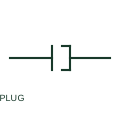
A plug-half representation identifies one side of a detachable connector.
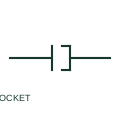
A socket-half representation identifies the mating interface for a detachable plug.
Elora Grid helps electrical teams work with drawings, specifications and equipment information. Explore the drafting workflow or join the early-access waitlist.