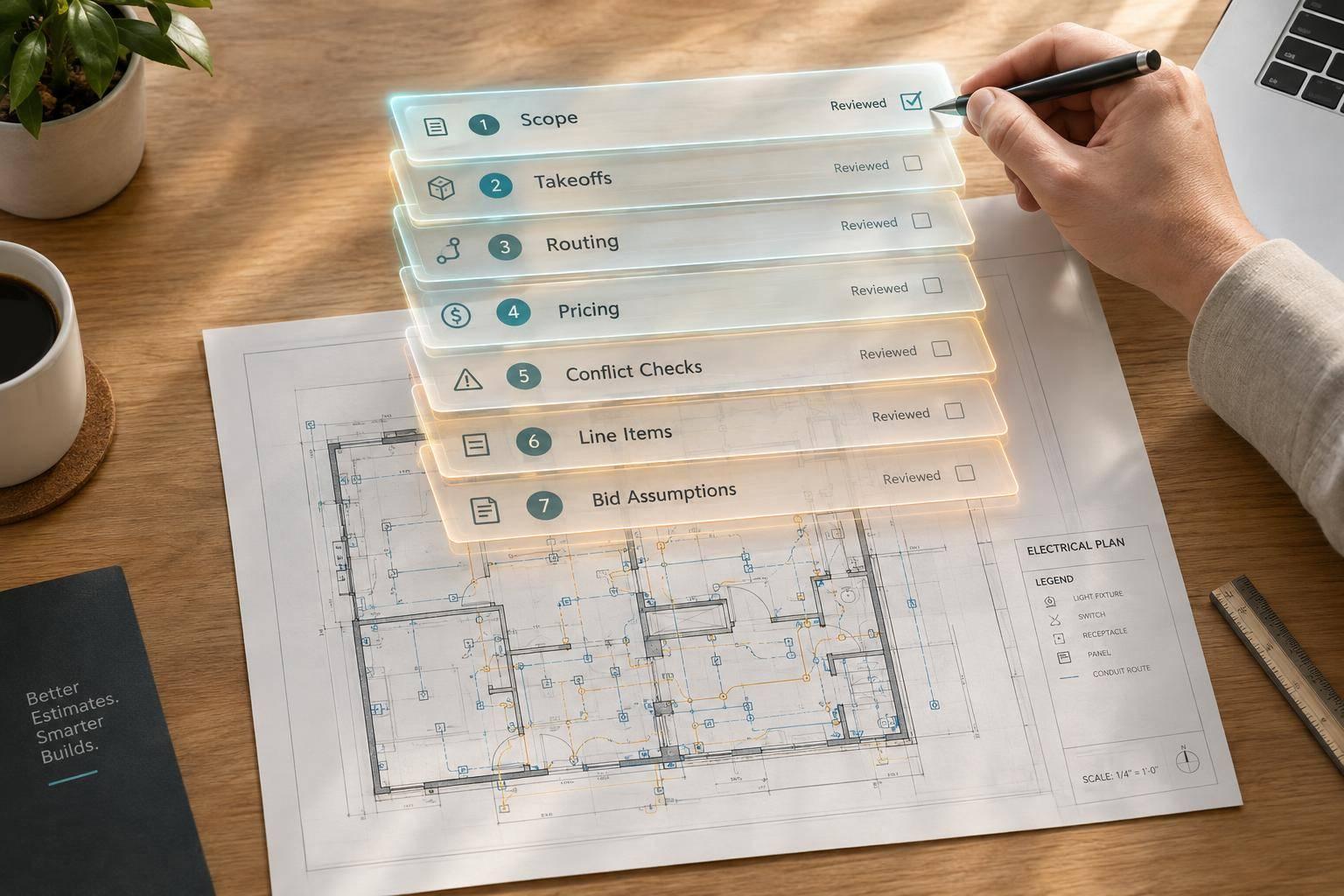
AI for Electrical Estimating: 7 Tasks Worth Automating
I’d use AI for 7 electrical estimating tasks - not to approve the bid. Start with the current drawings, specifications, and addenda. Require a source reference for each output, then check it before using it in the estimate.
Here’s where I’d put AI to work:
- Extract scope into a list of requirements and responsibilities.
- Count devices and equipment for a takeoff you can check.
- Measure cable and containment routes, keeping measured lengths separate from allowances.
- Match quantities to pricing data using approved quotes and labor rates.
- Flag drawing and specification conflicts for human review.
- Build estimate line items with separate material, labor, and other costs.
- Draft bid assumptions and exclusions tied to the scope you’ve priced.
My rule: AI prepares the draft; the estimator approves it. <u>Check every handoff</u>, keep unresolved issues visible, and test one task on a completed project before expanding. Measure review time and missed scope - not just how fast AI produces an answer.
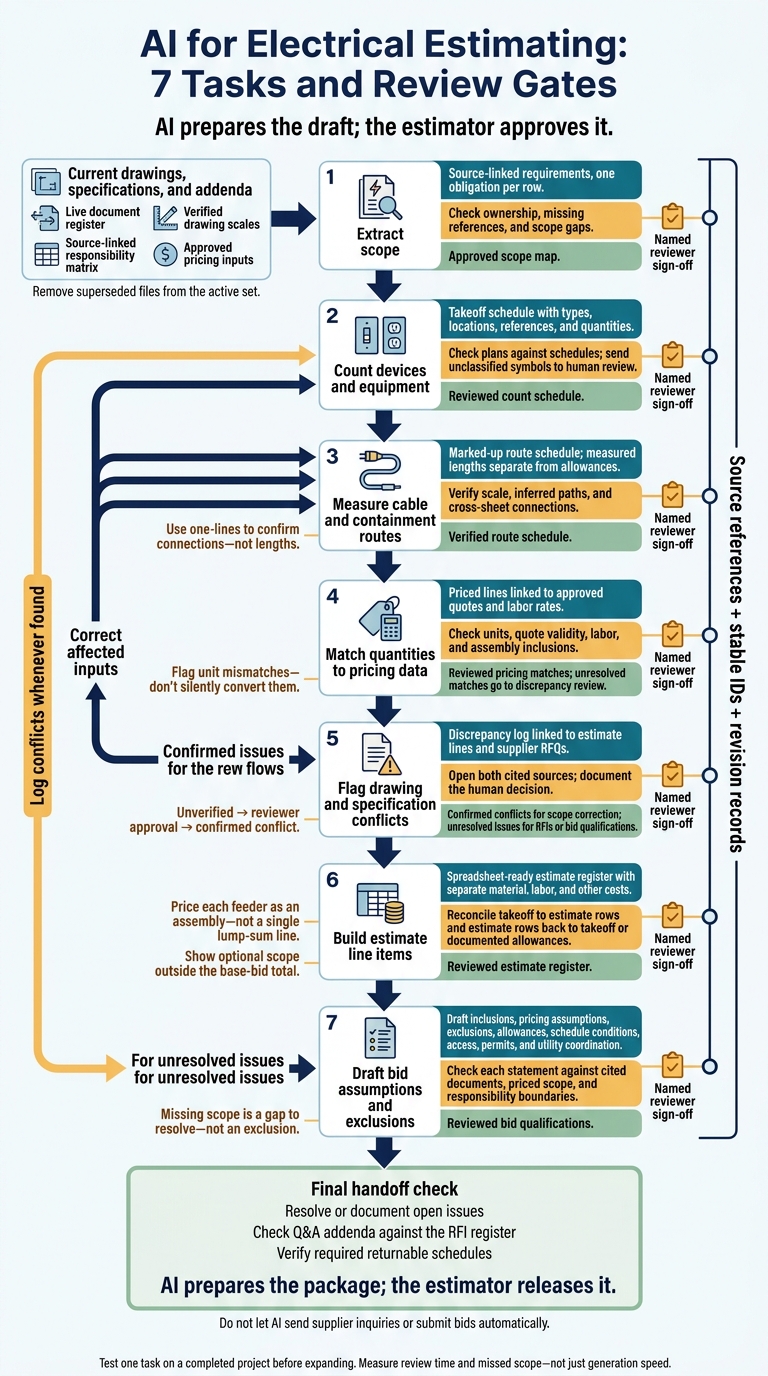
AI for Electrical Estimating: 7 Tasks and Review Gates
Prepare the Bid Documents for AI
Gather the current electrical drawings, one-lines, schematics, equipment schedules, Division 26 specs, architectural/site drawings, addenda, and binding clarifications. AI needs the full bid set, including every file that defines scope. Include Division 1 and any other requirements that affect electrical work, such as testing, control interfaces, document deliverables, and handover obligations.
Build a live document register that lists each file’s title, number, revision, issue date, and submission stage. Remove superseded files from the active set. Mark drawings as issued for review (IFR), approval (IFA), or construction (IFC). Each review cycle adds engineering effort, so account for it in the bid.
Check that PDFs are readable. Before measuring, verify drawing scales against stated dimensions - not just the title block. Then link each scope obligation to its source.
Create a responsibility matrix with one obligation per row. Give each row a stable requirement ID, name the responsible contractor or supplier, and include the source clause or drawing reference. Search for “shall,” “must,” and “is to provide” to identify obligations, and record each separately.
Extract the Supplier Data Requirements List (SDRL), or its equivalent. Check the specifications for drawings, calculations, test records, and manuals missing from that list. Group the requirements by design, quality/test, commercial, and operations/handover responsibilities.
Every scope row needs a source reference. Log conflicts in a clarification register, and do not let AI resolve them without review. Follow the project’s order-of-precedence rules. This matrix becomes the source map for later clarifications, assumptions, and exclusions.
Before extraction starts, define item names, cost codes, pricing sources, and reviewers. Use the company’s approved supplier and historical rate library. Once scope and pricing inputs are fixed, standardize the output format.
For takeoffs and priced line items that reviewers can check, use U.S. currency, date, and number conventions. Preserve trade sizes, source units, and dimensions exactly. Show converted values separately so reviewers can verify them.
sbb-itb-f008923
1. Extract Scope from Drawings and Specifications
Start with the sheets and specs that define the scope. Then extract one requirement at a time.
Required Inputs
Group the bid set by sheet type. Read the sheets alongside the specs, equipment schedules, scope, and returnable schedules to keep systems, equipment, locations, and references in context.
Outputs for Review
Build a source-linked review queue, with one requirement per row. Include system ratings, testing requirements, noise limits, and control or metering interfaces.
Keep AI confidence separate from the estimator’s decision: accepted, corrected, or sent for RFI. Label each item Comply, Partial, or Deviation. This gives estimators a clear queue to review before quantity takeoff.
Source and Revision Records
Include the document name, page, section, drawing number, and revision in each row. Give every requirement a stable ID so it can be traced across revisions.
Estimator Checks
Flag unclear notes, missing references, and cross-division scope gaps before assigning ownership. Add accepted obligations to supplier or internal-team checklists, and name an owner for each deliverable.
Log contradictions and gaps in the conflict register, submit an RFI, and record any unresolved item as an assumption at submission.
Use the extracted scope for takeoff, pricing, and conflict logging. Once the scope is mapped, move on to counting devices and equipment.
2. Count Devices and Equipment
Base counts on the extracted scope. Count only items tied to source-linked requirements.
Required Inputs
Use electrical floor plans, site drawings, equipment schedules, single-line diagrams, and schematics. Check electrical specifications for device types and ratings.
Outputs for Review
Create a takeoff schedule that reviewers can check against each source-linked requirement. Include descriptions, types, locations, sheet numbers, and quantities. Give each device or equipment type its own row. Mark each occurrence counted from drawings, and keep schedule-only items on separate rows.
Source and Revision Records
Record the drawing revision and issue stage with each count: Issued for Review, Issued for Approval, or Issued for Construction. Include drawing and schedule references so reviewers can confirm that the count matches both sources.
Estimator Checks
Check each marked occurrence against the plan and schedule, watching for overlapping annotations. Compare schedules with plans to catch schedule-only equipment. Use coordinated 2D and 3D views to check concealed equipment. Send unclassified symbols to human review rather than guessing their type. Record any conflicts in the conflict register.
Use the reviewed count schedule as the input for cable and containment takeoff.
3. Measure Cable and Containment Routes
Required Inputs
Start with the reviewed counts, floor plans, general arrangement drawings, risers, one-line diagrams, and electrical specifications. AI can trace conduit, tray, wireway, busway, feeder, and branch-circuit runs. Use one-lines to confirm connections - not lengths. Measure physical distances from dimensioned layouts and elevations.
Outputs for Review
Create a marked-up route schedule that records endpoints, pathway type and size, source sheets, revision level, and measured linear feet. Keep measured lengths separate from allowances for risers, transitions, terminations, slack, bends, and spare capacity. Count each vertical segment only once.
Source and Revision Records
Assign each route segment its own reference, including the source sheet, revision, and submission stage. Link segments that continue across sheets, and label each segment as measured or inferred.
Estimator Checks
Check inferred paths, cross-sheet connections, and congested areas before accepting quantities. Use coordination models to verify elevations, clearances, and access, and follow the contract’s document-precedence rules.
Use written dimensions first. Reject scaled measurements if the scale is unclear. Log unresolved scales, route gaps, and conflicting pathway requirements, then request written clarification.
Pass the verified route schedule to pricing.
4. Match Quantities to Pricing Data
Required Inputs
Start with the verified route schedule and takeoff IDs from the previous step. Give AI the approved quantities, normalized descriptions, units, installation methods, specification requirements, and assembly data. Include material rates, labor hours per unit, burdened labor rates, equipment allowances, and dated supplier quotes.
Use pricing sources in this order: approved project quote, current supplier agreement, then validated regional cost database. Use historical rates only as a fallback, and keep project overrides explicit.
Outputs for Review
Produce priced lines showing the takeoff ID, description, quantity, unit, material rate, labor hours, labor rate, extensions, pricing source, effective date, override, and approval status. Keep material, labor, equipment, subcontract, tax, freight, overhead, and profit in separate columns.
Source and Revision Records
Keep the same takeoff ID as you link each price to its quote, database record, or documented project cost. For every override, record its scope, approver, effective date, and expiration date. When quantities or rates change, preserve both the old and new values.
Maintain a validity register that checks quote expiration against both the bid due date and the required bid-validity period.
Estimator Checks
Use an exception queue for unmatched descriptions, stale rates, missing labor units, unit mismatches, duplicate assemblies, and unapproved quotes. Flag unit mismatches - don't silently convert them. Check whether assemblies already include fittings, supports, labor, or equipment.
Verify specified products, installation conditions, labor productivity, quote exclusions, waste allowances, tax, and freight. Recalculate quantity × approved material rate and labor hours × fully burdened labor rate. Review high-value items and low-confidence matches, and apply overhead and profit only once.
Send unresolved matches to the discrepancy review step.
5. Flag Drawing and Specification Conflicts
After pricing, use AI to flag drawing and specification conflicts that could change scope, quantities, or RFQs.
Required Inputs
Provide the electrical specifications, scope of work, equipment schedules, single-line diagrams, general arrangement drawings, reflected ceiling plans, risers, large-scale details, and addenda. Include the contract’s order-of-precedence clause.
Have AI compare equipment ratings, circuit identifiers, device counts, dimensions, and feeder information across these documents.
Outputs for Review
Request a discrepancy log that links each issue to the affected estimate lines and supplier RFQs. Each entry should include a stable conflict ID, both conflicting requirements, affected sheets or clauses, likely cost impact, severity, assigned reviewer, and resolution status.
Keep findings labeled unverified until a reviewer approves them. Then label them confirmed conflicts. Use the confirmed conflict log to correct scope before building line items.
Source and Revision Records
For each finding, cite the document name, sheet or page, revision, and exact location - for example, a schedule row or specification paragraph.
When addenda arrive, use the active document register to compare revised files. Review the amended source, not the addendum summary. Exclude superseded files from active conflict checks.
Estimator Checks
Open both cited sources before confirming a conflict. Verify dimensions using written callouts, and check how the contract treats detail views versus general views. Don’t infer design intent or resolve mismatches without review.
Seek written clarification for unclear requirements, including mismatches between equipment schedules and one-line diagrams.
Submit confirmed, unresolved conflicts as RFIs or bid clarifications. If they remain unanswered at the bid deadline, carry them into the bid as stated assumptions or qualifications and review them before submission. The estimator and the appropriate human reviewer - not AI - must approve every pricing basis, assumption, or qualification.
Pass confirmed conflicts to the next step: estimate line items and pricing.
6. Build Estimate Line Items
Turn the approved takeoff into a priced register the estimator can check row by row.
Required Inputs
Once quantities and pricing data are approved, feed AI the takeoff quantities, item descriptions, drawing/spec references, system and location tags, cost codes, supplier quotes, and pricing/labor databases.
Keep units consistent: EA for devices, LF for raceway and conductors, and HR for labor. For feeders, provide source and destination equipment, voltage, conductor size and material, insulation, set count, raceway type and size, route length, grounding requirements, and installation environment.
Outputs for Review
Request a spreadsheet-ready estimate register with one row per priced component. Group rows by system, location, specification section, or cost code. Include item ID, description, quantity, unit, material unit cost, labor hours per unit, loaded labor rate, equipment or subcontract cost, extension, confidence, and review status.
Calculate material, labor, and extension using quantity, unit cost, labor hours, and loaded rate. Separate rough-in, trim, testing, and other labor activities. For each activity, multiply quantity by the applicable labor unit to calculate hours. Keep material, labor, equipment, subcontract, allowance, and optional-scope amounts separate. Show optional scope outside the base-bid total.
Price each feeder as an assembly - not a single lump-sum line. Use component rows for phase, neutral, and grounding conductors; raceway; fittings; supports; terminations; identification; and testing. Add pull boxes and firestopping where required.
Calculate conductor footage from route length, conductors per set, and set count - not raceway footage alone. Show installation and pulling labor separately, or identify both clearly within the assembly, to avoid omissions and double counts.
Source and Revision Records
Link every row to its source reference, current drawing/spec revision, takeoff version, assembly version, and established pricing record. Identify the labor reference, productivity basis, and site-condition adjustments.
Retain the reviewer, approval timestamp, and reason for each change. Quantity changes must create a new revision, not overwrite the approved baseline.
Estimator Checks
Have AI flag missing quantities, zero- or negative-price items, duplicates, inconsistent units, missing labor, unpriced scope, and rows without a source.
Reconcile in both directions: every approved takeoff quantity must map to estimate rows, and every estimate row must trace to takeoff or a documented allowance. Explain differences caused by waste, routing additions, conductor multiplication, prefabrication, packaging, minimum order quantities, or scope transformations.
Before approval, check feeder and equipment assemblies for conductors, raceway, grounding, fittings, supports, terminations, testing, and installation labor.
Send unresolved pricing or scope gaps to the assumptions-and-exclusions draft.
7. Draft Bid Assumptions and Exclusions
Required Inputs
Base bid qualifications on the approved scope and pricing. Give AI the current electrical specifications, GA drawings, SLDs, equipment schedules, addenda, supplier quotes, conflict log, and Supplier Data Requirements List (SDRL).
Include access limits, owner-furnished equipment responsibilities, utility responsibilities, and testing requirements. Use the obligation map to separate contractor, owner-furnished, utility, and testing responsibilities.
Outputs for Review
Ask for draft bid language grouped into inclusions, pricing assumptions, exclusions, allowances, schedule conditions, access, permits, and utility coordination. Missing scope is a gap to resolve - not an exclusion. Review missing supplier scope before turning it into formal departures.
For owner-furnished equipment, separate furnishing from installation and commissioning responsibilities. Specify factory versus site testing, utility versus contractor work, and access conditions. Tie schedule qualifications to contract milestones. Show SDRL review and approval cycles as priced deliverables, not buried assumptions.
Source and Revision Records
Assign each draft clarification a stable ID, source clause or drawing reference, and document revision. When documents change, compare the revised binding text and log any added or changed obligations. Link each change to the affected clarification and priced item so the clarification stays tied to the priced scope.
Estimator Checks
Check each statement against the tender’s order of precedence, cited documents, priced scope, and responsibility boundaries. Confirm that allowances have approved amounts and exclusions do not conflict with required compliance.
Before approval, verify responsibilities for permits, utility coordination, access, testing, and documentation. Send unresolved responsibility boundaries to the final handoff check. Include all open assumptions, exclusions, and qualifications in that check before submission.
Check Each Handoff Before Bid Submission
After the seven automated tasks, add one final checkpoint: require a named reviewer to sign off at each handoff. Do not let AI send supplier inquiries or submit bids automatically.
Approve the scope map only when every obligation has its own source-linked row. For device counts, check ratings against schedules and drawings. For route measurements, check clearances, assumptions, and standards - not just length.
During pricing review, check supplier exclusions and missing components before accepting quote comparisons. For conflicts, require a documented decision rather than letting AI choose between documents. When reviewing the assembled estimate, reconcile quantities and costs with the approved takeoff and pricing. Check clarifications against the Instructions to Bidders before releasing them.
Before submission, compare published Q&A addenda with the internal RFI register. Record how each answer changes quantities, costs, or bid wording. Confirm that required returnable schedules follow the buyer’s required format. Keep any mismatch open until the estimator signs off.
Resolve open issues or document how they’ll be handled; don’t bury them in the total. Bring in engineering and commercial reviewers where needed. AI prepares the package; the estimator releases it.
Conclusion: Automate Tasks, Keep Estimator Judgment
Treat these seven tasks as one workflow, not seven separate automations. Scope extraction feeds counts and route lengths. Those quantities feed pricing and line items, while conflicts feed assumptions and exclusions. Only reviewed inputs move to the next stage.
Start small: test one defined task on a known project. Run scope extraction on the bid set and compare the results with the approved estimate. Check scope notes, takeoff schedules, priced line items, and conflict logs. Record missed obligations, unsupported entries, and review time - not just generation time.
Scale only when the workflow produces repeatable results and source references, conflict logging, and human review controls work reliably. The estimating team keeps responsibility for compliance, risk allowances, bid qualifications, and final bid approval and release.
FAQs
Which estimating task should I automate first?
Start by automating checks for scope conflicts across bid documents. Pull requirements from the scope and specifications, compare them with the drawings, and log contradictions with references to their sources. That gives your team a clear basis for submitting RFIs or clarifications before pricing.
These checks help you avoid absorbing unpriced changes later. They also turn unknowns into items your team can review and resolve.
How can I tell if AI improves estimate accuracy?
To check whether AI improves estimate accuracy, trace every output - line item, discrepancy, or compliance note - to a specific clause, drawing, or document page. Before committing to a price, check those citations against the original bid documents. Don’t take automated suggestions at face value.
If an AI tool can’t provide this audit trail, it isn’t reliable enough for estimating.
How should I protect bid documents when using AI?
Put verification and human review first. Avoid generic AI models that lack document context and may invent facts or compliance claims. Choose tools that link every value or requirement to its source page in your bid documents, so your team can review and approve it.
Never resolve contradictions silently. Log discrepancies between scopes, specifications, and drawings. Seek formal clarification or document exceptions so you don’t absorb unpriced changes after award.