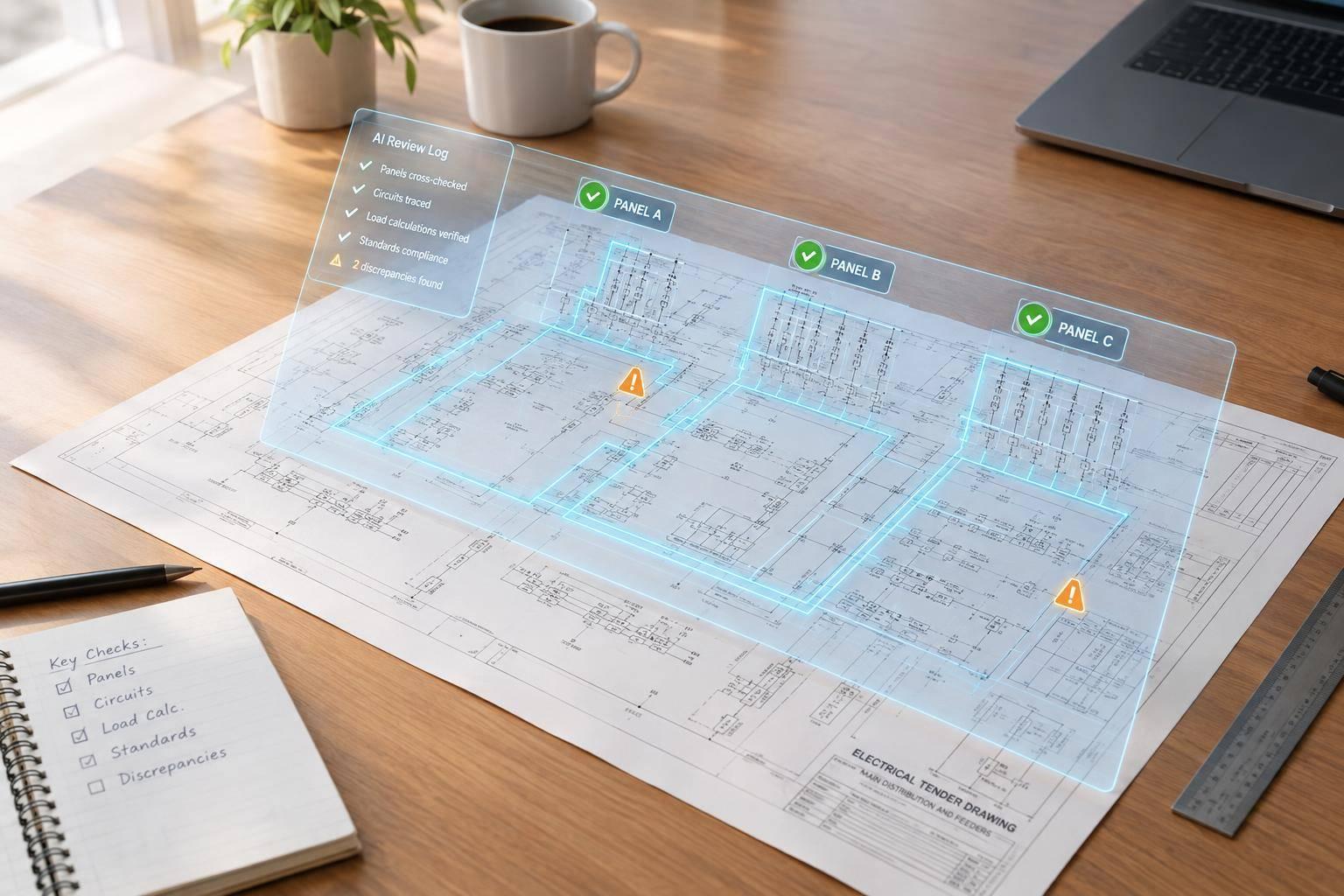
AI Tender Drawings: What Electrical Engineers Check
I use AI to flag tender drawing issues - not to approve the bid. Before pricing, I confirm the drawing revisions and check each flag against its source. A missing panel schedule or conflicting feeder rating stays unverified until an engineer checks it.
My review covers:
- The bid set: current sheets, addenda, missing files, and scope changes.
- Electrical data: equipment ratings, fault current, feeders, protection, panel schedules, and load calculations.
- Document agreement: matching equipment and circuit IDs across diagrams, plans, schedules, and specifications.
- Scope and price: trade duties, unanswered questions, and permitted bid assumptions.
I keep 3 linked records: a checklist, a discrepancy register, and a clarification log. Each finding gets a source reference and review status. <u>Missing information is not a passed check.</u> Before release, I require engineering and commercial approval of the bid basis.
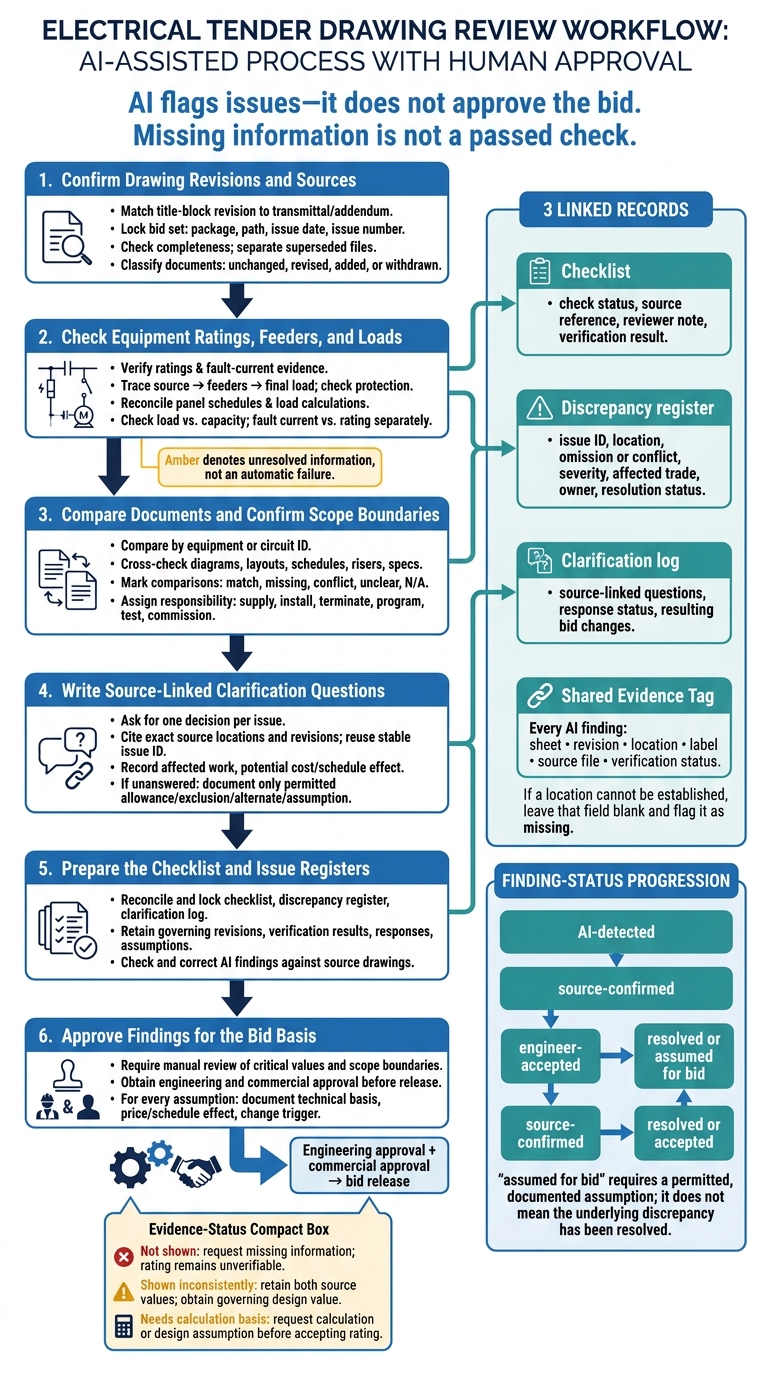
AI Tender Drawing Review: From Flags to Bid Approval
Mastering Electrical Drawings: Your Guide to Plans & Schematics
sbb-itb-f008923
Confirm Drawing Revisions and Sources
Match the title-block revision to the transmittal or addendum. Then lock the bid set by recording the package name, file path, issue date, and issue number. Store superseded files separately and use them only for comparison.
Once the bid set is frozen, check every sheet against the received package.
### Check Sheet Details and Package Completeness
For each drawing, record the project name and number, discipline, sheet title and number, issue date in MM/DD/YYYY, revision identifier and description, issue status, designer, and checker/approver.
Compare the received set with the drawing index and specification contents. Inventory every sheet type: notes, legends, schedules, diagrams, plans, risers, details, controls, fire alarm, communications, utility, and interface documents.
Sheet number Revision Date Issue status Review finding E-001 Rev 2 MM/DD/YYYY Issued for Tender Current; legend and notes reviewed E-201 Rev 1 MM/DD/YYYY Preliminary Not accepted as a bid requirement; confirm status E-305 Rev 2 MM/DD/YYYY Issued for Tender Missing from received PDF package E-410 Rev 0 MM/DD/YYYY Issued for Tender Duplicate filename; content differs from register
Flag duplicate sheet numbers, different content under the same filename, blank or illegible sheets, missing references, and mismatched architectural backgrounds.
Every AI finding must identify the sheet, revision, location, label, source file, and verification status. If there’s no label or zone, state that and give a precise location. If you can’t establish the location, leave that field blank and flag it as missing.
After confirming the package is complete, compare each revision with the prior issue to identify scope changes.
Separate Tender Scope From Preliminary Notes
Separate tender changes from draft-only notes. For each revised sheet, record the affected scope, revision marks, and pricing impact. Read the revised notes too - revision clouds don’t replace the change log.
For an addendum, classify documents as unchanged, revised, added, or withdrawn. Check the revised source documents rather than relying on the cover summary.
Treat “by others,” “NIC,” and “owner-furnished” as responsibility boundaries, not automatic exclusions of all related electrical work. Before assigning scope, check the specifications, scope matrix, addenda, and contractual precedence rules. Put unresolved wording in the clarification log instead of silently building an assumption into the estimate.
Check Equipment Ratings, Feeders, and Loads
Once the tender package and bid set are frozen, check that ratings, feeders, and loads match across the source documents. Each rating must be supported by that same source package.
Verify Equipment and Fault Ratings
Check transformers, generators, UPS systems, BESS, switchgear, switchboards, panelboards, disconnects, and transfer equipment against the project basis of design, specifications, equipment schedules, one-line diagrams, and applicable adopted code.
For each item, extract the tag, service voltage, phase, frequency, grounding, source configuration, current or kVA rating, bus rating, interrupting rating/AIC, SCCR, withstand rating, enclosure type, and temperature or elevation limits. Keep source units exactly as shown, and label converted values separately. Record only evidence and discrepancies.
Trace fault current at each location to its supporting calculation or utility data. Verify transformer impedance, feeder impedance, operating modes, and contributions from generators, motors, or converters. Compare the resulting duty with device interrupting ratings and equipment short-circuit ratings. A service-level value does not establish downstream panel duty.
Use these statuses to record missing or conflicting ratings in the discrepancy register.
| Review status | Evidence to record | Required action |
|---|---|---|
| Not shown | Missing rating, enclosure requirement, or fault-current value | Request the missing information and mark the rating unverifiable |
| Shown inconsistently | Conflicting values and their source locations | Record both source values and obtain the governing design value |
| Needs calculation basis | Duty without a supporting calculation | Request the calculation or stated design assumption before accepting the rating |
After confirming ratings, trace how power reaches each load and where protection changes.
Trace Circuits, Feeders, and Protection
Follow each path from the utility or other source through transformers, generators, UPS systems, or BESS, as applicable, then through feeders to the final load. Flag orphan circuits, unexplained shared feeders, missing protection, and unclear spare or future circuits.
When design inputs are complete, check conductor ampacity, protection compatibility, voltage-drop criteria, grounding and bonding, and transfer controls and interlocks. Use 125% of continuous load plus noncontinuous load, unless the adopted code or 100%-rated equipment rules apply.
Use the circuit trace register below to support checklist entries. Without stated lengths, voltage-drop checks remain unverifiable.
| Register fields | Required content |
|---|---|
| Source, destination, ID, references | Originating and terminating tags; exact circuit ID; sheet, detail, schedule row, and revision |
| Rating, conductors, load, protection | Voltage, phase, frequency, feeder rating; conductor count, size, insulation, raceway, grounding conductor; connected/demand load; breaker or fuse ratings |
| Status, responsibility, clarification | Normal/alternate source and emergency classification; confirmed, orphan, shared, spare, future, or unresolved status; responsible trade and clarification question |
Next, compare schedules with the actual circuit and load data.
Reconcile Panel Schedules and Load Calculations
Compare panel tag, location, voltage, phase, wire system, main rating, bus rating, spaces, connected load, demand load, spare capacity, and feeder data. Check mechanical, motor, HVAC, kitchen, EV, lighting, receptacle, and special loads for omissions, duplicates, or unexplained changes.
Check assumptions, not just arithmetic. Mark calculations unverifiable when required inputs are missing. Empty breaker spaces do not prove spare capacity.
Record unresolved discrepancies and bid impacts in the clarification log.
| Documents to compare | Source values to retain | Conflict or omission / discrepancy type | Bid impact to record |
|---|---|---|---|
| Panel schedule ↔ single-line diagram | Exact main, bus, voltage, and feeder values from both sources | Unequal ratings / shown inconsistently | Gear, feeder, or protection scope |
| Plans ↔ equipment schedules ↔ panel schedules | Equipment tags, quantities, ratings, and circuit assignments | Missing or duplicated loads / not shown or inconsistent | Circuit count, connections, and capacity |
| Load calculation ↔ schedules ↔ specifications | Connected/demand totals, power factor, demand factors, and required reserve | Unsupported assumptions / needs calculation basis | Upstream sizing and reserve capacity |
Compare Documents and Confirm Scope Boundaries
After checking ratings and loads, compare the documents that define installation requirements and scope.
Match Single-Line Diagrams, Layouts, and Schematics
Compare by equipment or circuit ID - not by sheet alone. Create one matrix row per ID and one column per document type. Check the equipment tag, voltage, phase, ampacity, fault rating, feeder ID, source, destination, physical location, connection method, and control function.
Mark each cell as match, missing, conflict, unclear, or not applicable. Attach exact source references to every finding.
| Equipment or circuit ID | Single-line diagram | Layout | Panel/load schedule | Riser | Control schematic | Specification/vendor data |
|---|---|---|---|---|---|---|
| Panel ID | match / missing / conflict / unclear | match / missing / conflict / unclear | match / missing / conflict / unclear | match / missing / conflict / unclear / not applicable | match / missing / conflict / unclear / not applicable | match / missing / conflict / unclear |
| Feeder ID | match / missing / conflict / unclear | match / missing / conflict / unclear | match / missing / conflict / unclear | match / missing / conflict / unclear / not applicable | match / missing / conflict / unclear / not applicable | match / missing / conflict / unclear |
| Controlled-equipment ID | match / missing / conflict / unclear | match / missing / conflict / unclear | match / missing / conflict / unclear | match / missing / conflict / unclear / not applicable | match / missing / conflict / unclear | match / missing / conflict / unclear |
Check equipment orientation, door swing, maintenance access, working clearances, cable entry, routing, and sleeve and shaft continuity between floors wherever they affect installation scope or code compliance. Use written dimensions, not scaled measurements. Verify clearances against the applicable NEC working-space requirements.
Trace each control path from the initiating device to the controlled equipment. Confirm that the control schematic, schedule, single-line, specifications, and narrative show the same sequence. Flag undefined symbols and equipment that appears in one document but is missing from schedules or specifications. Before recording a conflict, check the cited source region.
Once the documents align, confirm who owns each interface.
Confirm Trade Responsibilities and System Interfaces
Assign responsibility by task, not by equipment. For each interface, separate the duties to supply, install, terminate, program, test, and commission. Include permits, inspections, utility coordination, and fees. Vendor-furnished scope does not establish who must install it.
Check normal and emergency interfaces separately for generators, ATS equipment, UPS bypasses, BESS controls, and photovoltaic interconnections. Confirm who handles control wiring, protective settings, startup, training, and closeout documents. Account for demolition, temporary power, shutdown windows, and existing-condition verification.
Classify each discrepancy by its primary effect, then record secondary effects, impact level, and the reason for that level. Apply the order-of-precedence clause to any remaining conflicts.
Turn each unresolved mismatch into one source-linked question.
Write Source-Linked Clarification Questions
Ask for one decision per issue. Cite the exact drawing, detail, schedule row, specification clause, and revision. State the conflict, affected work, and potential cost or schedule effect. Link the question to the same stable issue ID used in the discrepancy register.
If no answer arrives by bid close, document only an allowance, exclusion, alternate, or assumption permitted by the bid requirements. Check responses against revised documents, then update price lines and RFQs.
| Clarification register fields | What to record |
|---|---|
| ID, date, question, source reference | Stable issue ID; date; decision requested; exact document locations and revisions |
| Issue, affected scope, impact | Observed discrepancy; equipment or circuit ID; effect category; estimated cost or schedule impact and its basis |
| Proposed tender assumption | Explicit inclusion, exclusion, allowance, or alternate pending confirmation |
| Respondent, response status, final action | Responsible party; open, submitted, answered, incorporated by addendum, assumed for bid, or closed; response date and resulting bid changes |
Conclusion: Complete a Verified Tender Review
Prepare the Checklist and Issue Registers
After comparing the sources, close the review by locking the checklist, discrepancy register, and clarification log. Each record should include:
- Checklist: check status, exact source document and sheet reference, reviewer note, and verification result. Cover revisions, ratings, circuit and feeder continuity, load totals, document agreement, and scope boundaries.
- Discrepancy register: issue ID, location, omission or conflict, severity, affected trade, owner, and resolution status.
- Clarification log: unanswered questions.
Upload the complete tender package and identify the governing and superseded revisions. Link each finding to its source, check and correct the finding against the source drawings, and obtain engineering approval before release.
With the records complete, move from recording issues to approving the bid basis.
Approve Findings for the Bid Basis
Track each finding through AI-detected → source-confirmed → engineer-accepted → resolved or assumed for bid. Missing or illegible source information is an information gap - not a passed check.
Require manual approval of service voltage, ampacity, available fault current at the equipment, interrupting and short-circuit ratings, feeder sizing and protection, emergency-power arrangements, load totals, and scope boundaries. Check load against equipment capacity and available fault current against the applicable equipment rating separately.
Before release, reconcile all three records and obtain engineering and commercial approval. Keep accepted findings, responses, governing revisions, and permitted assumptions in the bid-basis record. For every assumption, document its technical basis, price or schedule effect, and change trigger.
FAQs
How can I spot issues that AI misses?
Use AI to support your expert judgment - not as the final authority. Check every AI finding against the source drawings and project documents. You remain responsible for engineering and commercial decisions.
Record conflicts, ambiguities, and gaps in a conflict and variation register. If you need to price before the issuer formally responds, document your assumptions in your bid schedules or as a formal departure. Check your interpretations against the contract’s order-of-precedence clause.
Which discrepancies should delay my bid?
Hold off on submitting your bid if unresolved technical or commercial risks could leave you covering costs after award. Record conflicts between the scope, specifications, and drawings in a conflict and variation register, and request formal clarification.
If key ambiguities - such as conflicting equipment ratings or circuit details - remain unresolved by the bid deadline, check whether contract precedence or the issuer’s written addendum settles them. If neither does, state your assumptions in the bid schedules to avoid taking on an unpriced change.
How should I handle addenda after bid-set approval?
Treat every addendum as a binding change, not optional reading. Compare it with your previous response to spot what changed. Cover notes may leave out important edits or describe them vaguely.
Check the tender’s order-of-precedence clause to confirm which document governs. Base your compliance and pricing on the latest issue. Record unresolved conflicts in a variation register, request formal clarification, and state your assumption in your schedule.