
Electrical Estimating Software: 7 Features to Compare
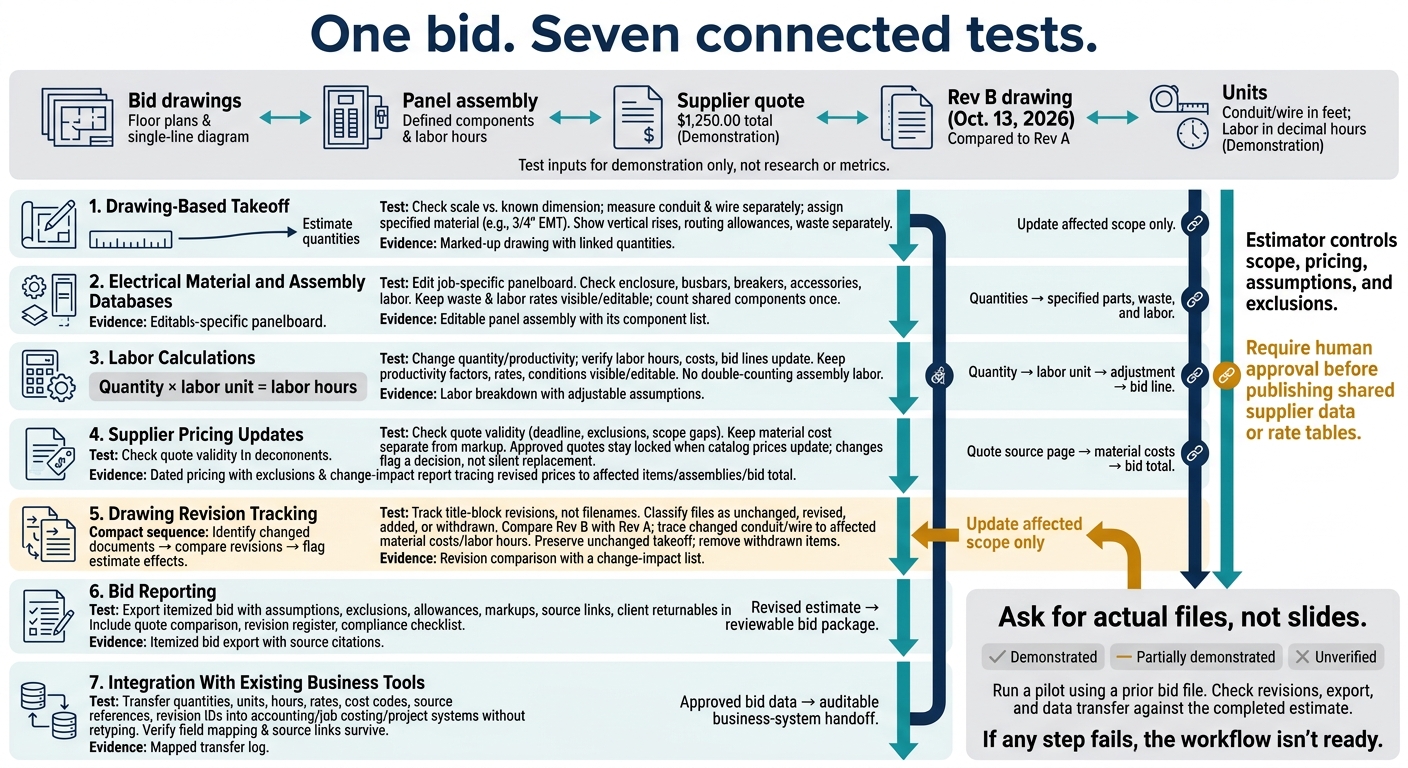
I’d compare electrical estimating software by testing one bid from drawing takeoff to final export - not by counting features. Use your own drawings, a $1,250.00 supplier quote, and a revised sheet to check whether quantities, costs, and labor hours stay linked.
Here are the seven features I’d check:
- Drawing-based takeoff: Measure conduit and wire in feet, check scale, and trace quantities to drawing marks.
- Material and assembly databases: Check that assemblies include the specified parts, waste, and labor.
- Labor calculations: Verify quantity × labor unit, with editable rates and productivity assumptions.
- Supplier pricing updates: Check quote dates, exclusions, and price changes without replacing approved prices.
- Drawing revision tracking: Compare title-block revisions and trace scope changes to estimate lines.
- Bid reporting: Export itemized bids with assumptions, exclusions, source links, and client forms.
- Business tool integration: Transfer quantities, hours, rates, and cost codes without retyping.
My rule: <u>ask for actual files, not slides</u>. Keep pricing and scope decisions with the estimator, then run a pilot before buying. This is a feature checklist, not a ranking.
Electrical Estimating Software: 7 Workflow Tests
Define Your Electrical Estimating Needs
Start with the tasks that take the most estimator time: document review, quote comparison, material pricing, and labor calculations. Base your requirements on the work you bid. Custom projects, such as microgrids and switchrooms, need software that reads RFQs, scopes, and drawings. Dense specs call for checks that flag conflicting ratings and clashes. These needs set the bar for the features below.
Next, set change-control rules around bid deadlines. When documents change mid-bid, require a register that tracks changed files by title block revision - not filename. When software extracts document data, keep pricing decisions, assumptions, and exclusions with the estimator.
Map how estimate data must move through the business. Specify how the software sends priced schedules and labor hours to accounting, imports price books into estimates, and sends supplier RFQs to purchasing. For project management systems, define where bid documents come from and where deliverables are filed.
Build a demonstration pack with bid drawings that include floor plans and a single-line diagram, a panel assembly with defined components and labor hours, a supplier quote, and a revised drawing. Use feet for conduit and wire lengths, and decimal hours for labor.
Use this test pack to compare the seven features below.
Use a supplier quote totaling $1,250.00 and a Rev B drawing dated Oct. 13, 2026. Compare Rev B with Rev A to identify changed conduit and wire quantities, then check the affected material costs and labor hours. Require source links to the quote page and revised drawing location so a reviewer can verify each change.
sbb-itb-f008923
1. Drawing-Based Takeoff
Use your test drawings to check how the software reads symbols, measures runs, and links quantities to the source sheet.
Electrical Workflow Coverage
Check equipment, device, and fixture symbols, and confirm panel locations before pricing. Verify that the software identifies scope items and flags conflicting equipment ratings or scope mismatches for review.
Once it recognizes the symbols, test how it measures and classifies each run.
Configurable Estimating Assumptions
Check the drawing scale against a known dimension, then measure a conduit run in feet.
Assign the measured run to the specified material, such as 3/4-inch EMT.
Confirm that the linked material costs and installation labor apply. Show vertical rises, routing allowances, and waste separately. Measure wire lengths separately, too.
Next, check that each measured item remains linked to its source.
Source-to-Bid Traceability
Verify that measured quantities automatically populate the estimate. Then click any estimate line to trace it back to the drawing page and takeoff mark.
2. Electrical Material and Assembly Databases
After takeoff, check how the software converts quantities into priced item libraries and assemblies.
Database Coverage
Confirm the database includes conduit, wire, fittings, breakers, and fixtures - and the specifications needed to select each item. Check whether you can build a project-specific library from bid documents, supplier quotes, and historical cost data.
The item data must match the project specifications, not just a familiar part name.
Configurable Estimating Assumptions
Test whether estimators can edit items and approve pricing assumptions for the full panelboard assembly. Check the enclosure, busbars, main and branch breakers, accessories, installation, and commissioning labor. Check that all required parts and labor load into the assembly with no gaps. Compare the supplier quote with the required package so excluded components do not disappear from the estimate.
Keep labor rates and waste allowances visible and editable within the assembly.
Manual Work Reduction
Test reusable lighting, receptacle, and conduit assemblies to confirm they include the correct materials, waste, and labor. Verify that shared components are counted only once and that changes to assumptions update the cost. Every priced assembly still needs an estimator’s review.
Labor calculations should update when the database changes.
3. Labor Calculations
Configurable Estimating Assumptions
Quantity × labor unit should equal labor hours. Check that every item has clearly labeled units, then verify how those hours translate into costs.
Keep productivity factors, labor rates, and installation conditions visible and editable in the priced schedule. Include installation and commissioning scope that affects these adjustments so reviewers can quickly audit each labor line.
Source-to-Bid Traceability
Require a clear path from drawing quantity to labor unit, adjustment, and bid line. Link each labor line to its source drawing and page so reviewers can check why installation or testing scope was included.
Manual Work Reduction
During a demo, change a quantity and a productivity assumption. Check whether the affected labor hours, costs, and bid lines update automatically. Do not double-count assembly labor as line-item labor.
Once labor is set, check how supplier pricing updates change the same estimate.
4. Supplier Pricing Updates
Electrical Workflow Coverage
Check whether the software updates material catalogs through distributor feeds, pricing services, and supplier quote imports. Effective dates and account-specific pricing should stay visible. Compare each quote’s validity date with the bid deadline before accepting its price.
Configurable Estimating Assumptions
Keep material cost separate from markup. Waste factors and manual price overrides should remain visible and documented. Approved supplier quotes should stay locked when catalog prices update. An update should flag a decision - not silently replace an agreed price.
Source-to-Bid Traceability
Test the workflow with a supplier quote revision. Follow the revised price from its source page through the affected item costs, assemblies, and bid total. Require a change-impact report so reviewers can confirm exactly what changed.
Manual Work Reduction
Check whether quote imports flag exclusions and scope gaps in the priced materials.
5. Drawing Revision Tracking
Electrical Workflow Coverage
After updating prices, check how the software handles drawing revisions before you lock the bid. Revision tracking keeps the estimate tied to the latest scope. Look for a three-step workflow: identify changed documents, compare revisions, and flag their effects on the estimate.
The document register should group files as unchanged, revised, added, or withdrawn using title-block revision markers - not filenames. Compare revised specifications, too. A changed equipment rating can alter the scope even when the drawing looks the same.
Configurable Estimating Assumptions
Save the pre-revision estimate so you can compare its quantities and costs with the revised version. If a revision introduces a contradiction, record it in a change log and price the work using a stated assumption until clarification arrives.
Source-to-Bid Traceability
Link each confirmed change to its revised sheet or specification page and the estimate lines it affects. The addendum note alone isn’t enough. Use a structured diff to isolate the binding changes.
Manual Work Reduction
Test the workflow with a late-issued revision that changes a conduit route or panel schedule. Review only the flagged changes, and reprice the affected takeoff, assemblies, and labor. Unchanged takeoff should stay intact. Withdrawn items drop out of the revised bid.
Those revision flags should carry through to bid reporting without manual rework.
6. Bid Reporting
Electrical Workflow Coverage
Once quantities, labor, and pricing are set, check how the software turns your estimate into a bid package for review, approval, and submission. The export should include the quote comparison, revision register, and compliance checklist in one report packet.
Configurable Estimating Assumptions
Show markups, exclusions, and allowances in the report body - not just the total. First-pass priced schedules should also state the assumptions behind the estimate.
Source-to-Bid Traceability
After revisions and pricing updates, verify that every line in the final report links to its source. Each bid line should point to the relevant clause, drawing, or schedule.
Manual Work Reduction
Auto-fill client returnables - the schedules and templates the client requires - while keeping their original format. Check that estimate changes carry through to all affected bid outputs.
From there, the same estimate data should flow into your existing business tools without retyping.
7. Integration With Existing Business Tools
Electrical Workflow Coverage
After bid reporting, check how the estimate moves into accounting, job costing, and project systems. Confirm which file types each system accepts, how imports and exports work, and whether source links stay intact during transfers.
Configurable Estimating Assumptions
Check who can edit and approve shared supplier prices and labor rates. Make sure those permissions also apply during export. Require human approval before publishing shared supplier data or rate tables.
Source-to-Bid Traceability
Source links need to survive export for integrations to work. Check the field mapping so quantities, units, rates, cost codes, source references, and revision IDs all reach the correct fields.
Manual Work Reduction
Run a pilot using real bid documents and measure how much manual reentry you eliminate across export, import, and filing. Export the bid package, generate the required deliverables, and file approved outputs back into your system with as little duplicate entry as possible.
Electrical Estimating Software Comparison Checklist
Mark each feature as demonstrated, partially demonstrated, or unverified. Use the same drawings, supplier quote, and revised documents from the workflow tests above. Ask for actual files - not screenshots or slides. Treat accuracy and time savings as unproven until the demo shows them.
| Feature | Required function | Verify | Demo evidence | Accuracy impact | Manual work impact | Review and traceability |
|---|---|---|---|---|---|---|
| Drawing-Based Takeoff | Extract scope, quantities, dimensions, and equipment ratings from drawings. | Can users check the scale and trace quantities to marked drawings? | Marked-up drawing with linked quantities. | Catches scaling errors. | Reduces counting and transcription. | Links each quantity to its source. |
| Electrical Material and Assembly Databases | Maintain editable assemblies with job-specific overrides. | Can an estimator edit assembly components for a specific job? | Editable panel assembly with its component list. | Prevents omitted components. | Reduces repeated assembly entry. | Shows individual parts and scope links. |
| Labor Calculations | Convert scope into editable labor hours. | Are productivity assumptions visible? Are factory testing and site commissioning separate? | Labor breakdown with adjustable assumptions. | Aligns hours with required work. | Reduces calculations and specification searches. | Shows assumptions and supporting clauses. |
| Supplier Pricing Updates | Flag outdated pricing, supplier exclusions, and scope gaps. | Are quote dates and missing scope visible? | Dated pricing with exclusions. | Prevents stale prices and incomplete quotes. | Reduces price-sheet updates and quote checking. | Keeps price sources and exceptions on record. |
| Drawing Revision Tracking | Compare revisions for changes that affect scope. | Does the comparison separate scope changes from formatting changes? | Revision comparison with a change-impact list. | Catches added or altered scope. | Focuses review on changes that affect scope. | Links changes to affected estimate lines. |
| Bid Reporting | Produce itemized bids with source citations and client returnables. | Can it use the client’s template and cite each compliance position? | Itemized bid export with source citations. | Shows missing returnables and unsupported claims. | Reduces bid-form preparation. | Supports line-by-line source checks. |
| Integration With Existing Business Tools | Transfer structured estimate data into accounting, job costing, or project systems. | Does the transfer map each field correctly? | Mapped transfer log. | Reduces transcription errors. | Reduces duplicate entry. | Makes the handoff auditable. |
When two documents disagree, follow the contract’s order-of-precedence rule. Record the conflict rather than hide it. The estimator decides whether to reprice, clarify, or qualify the bid.
Conclusion: Verify the Full Estimating Workflow
After comparing the seven features, test the full workflow from takeoff to handoff. Choose software that keeps estimate data connected through revisions, bid reports, and transfers to your business tools.
Before committing, run a pilot using a prior bid file. Check the revision, export, and data transfer against the completed estimate. If any step fails, the workflow isn't ready.
Keep scope, pricing, and exclusions under the estimator's control. Flag scope gaps and pricing exceptions for human review rather than resolving them automatically. Approve the software only after the pilot shows that the workflow and the estimator's decisions remain intact through handoff.
FAQs
Which features matter most for my electrical projects?
Focus first on features that improve accuracy and cut manual work early in the bidding process. These include automated document registration to track revisions, clause-by-clause compliance checks to spot commercial risks, and structured data extraction from specifications, drawings, and equipment schedules.
Also look for source citations so you can verify outputs, along with automated conflict detection to flag discrepancies between scopes of work and drawings.
How can I validate automated takeoff accuracy?
Put traceability and human oversight first. Keep a clear audit trail that links every quantity, measurement, and material count to its source drawing, page, or specification clause.
Before finalizing a bid, check the software’s outputs against project documents and make sure assumptions are visible. Use the software to flag conflicts between drawings and scopes of work. Have a person review judgment calls and approve the final data before pricing or submission.
How do I measure ROI during a software pilot?
To measure return on investment (ROI), compare your team’s pilot results with baseline metrics. Track the time spent reviewing bid packages, building document registers, and comparing revision clauses. Pay close attention to tasks that take up senior staff time.
Measure hours saved on reading, retyping, and manual data entry. To check accuracy, compare the scope gaps, exclusions, and missed changes the software flags with those found during manual review.