TS NO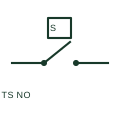
Temperature switch NO
A temperature-operated NO switch changes from open to closed under its specified actuation condition.
Schematic
Plan mark for a wall-mounted room thermostat controlling heating or cooling equipment.
In plain English
A room thermostat is drawn as a small circle or square with a temperature mark, a theta or the letter T, at its wall position. A control link connects it to the heater, valve or air-conditioning unit it controls.
Its position affects comfort: it should not be near heat sources, in direct sunlight or on an external wall. The plan gives the designer a chance to check this, and the mounting height is usually stated in notes.
It does not show whether the thermostat switches mains directly or provides an extra-low-voltage control signal. Wiring type follows the controlled equipment.
Plan mark for a wall-mounted room thermostat controlling heating or cooling equipment. A schematic temperature switch shows a contact; the plan mark locates the room control.
Read the source: IEC graphical symbols for diagrams
IEC 60617 installation-plan style (architectural and topographical installation symbols); independently drawn, not certified IEC geometry or a database identifier.
Shown as an independently authored educational illustration. Use the cited publication and drawing legend to verify the required drafting form.
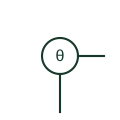
A room thermostat is drawn as a small circle or square with a temperature mark, a theta or the letter T, at its wall position. A control link connects it to the heater, valve or air-conditioning unit it controls.
Its position affects comfort: it should not be near heat sources, in direct sunlight or on an external wall. The plan gives the designer a chance to check this, and the mounting height is usually stated in notes.
It does not show whether the thermostat switches mains directly or provides an extra-low-voltage control signal. Wiring type follows the controlled equipment.
A schematic temperature switch shows a contact; the plan mark locates the room control.
These public references support the explanation and provide further detail. Their graphics and downloadable files remain with their publishers.
IEC graphical symbol context; independently drawn here.
This illustration was authored independently by Elora Grid to explain the concept. It is not reproduced from a customer drawing, an official standard graphic or a manufacturer CAD file. Its correspondence to an exact IEC or IEEE symbol identifier has not been certified.
SVG and DXF downloads contain this original artwork. DXF uses unscaled drawing units; a GA envelope supplies no product dimensions, clearances or fabrication information. Original artwork is available under CC BY 4.0. Third-party references retain their own terms.
Elora Grid helps electrical teams work with drawings, specifications and equipment information. Explore the drafting workflow or join the early-access waitlist.