W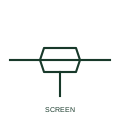
Screened conductor
A single conductor enclosed by a drawn screen outline, showing that the core has a conductive shield around it.
IEC
A screened conductor whose screen tail is drawn to an earth symbol, recording where the shield is earthed.
In plain English
This form combines the screen outline with an explicit earth connection on the screen tail. It answers the question that a plain screened conductor leaves open: which end of the screen is earthed. Instrument drawings commonly earth the screen at the control end only, while drive motor cables are often earthed at both ends through 360 degree glands.
When the earth mark appears at only one end of the cable, the other end of the screen is normally cut back and insulated. A reader should not infer that both ends are bonded unless both are drawn. The earth symbol used on the tail may be functional earth, protective earth or a clean instrument earth bar, and those are not interchangeable.
Check both ends of the cable to see whether the screen is earthed at one or both. Identify which earth system the screen tail lands on. An earthed screen shows the termination decision; a plain screened conductor shows only that a shield exists.
A screened conductor whose screen tail is drawn to an earth symbol, recording where the shield is earthed. An earthed screen shows the termination decision; a plain screened conductor shows only that a shield exists.
Read the source: Autodesk IEC-60617 preview: Cable identification and twisted-pair annotation · AutoCAD Electrical: Earthing, sources and surge protection
Independent illustration combining IEC-context screen and earth forms; not certified IEC geometry.
Shown as an independently authored educational illustration. Use the cited publication and drawing legend to verify the required drafting form.
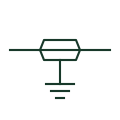
This form combines the screen outline with an explicit earth connection on the screen tail. It answers the question that a plain screened conductor leaves open: which end of the screen is earthed. Instrument drawings commonly earth the screen at the control end only, while drive motor cables are often earthed at both ends through 360 degree glands.
When the earth mark appears at only one end of the cable, the other end of the screen is normally cut back and insulated. A reader should not infer that both ends are bonded unless both are drawn. The earth symbol used on the tail may be functional earth, protective earth or a clean instrument earth bar, and those are not interchangeable.
An earthed screen shows the termination decision; a plain screened conductor shows only that a shield exists.
These public references support the explanation and provide further detail. Their graphics and downloadable files remain with their publishers.
Public IEC-60617 preview family for cable annotation.
Public IEC-oriented earth and bonding forms used on the screen tail.
This illustration was authored independently by Elora Grid to explain the concept. It is not reproduced from a customer drawing, an official standard graphic or a manufacturer CAD file. Its correspondence to an exact IEC or IEEE symbol identifier has not been certified.
SVG and DXF downloads contain this original artwork. DXF uses unscaled drawing units; a GA envelope supplies no product dimensions, clearances or fabrication information. Original artwork is available under CC BY 4.0. Third-party references retain their own terms.
A single conductor enclosed by a drawn screen outline, showing that the core has a conductive shield around it.
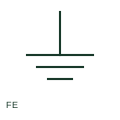
Functional earth serves an operational purpose such as a documented EMC or signal-reference connection.

An earth connection specifically designated as low-noise, used for sensitive measurement and electronics references.
Elora Grid helps electrical teams work with drawings, specifications and equipment information. Explore the drafting workflow or join the early-access waitlist.