SW
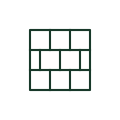
Network switch symbol
Network symbol for an Ethernet switch, a box with crossing arrows, used on electrical and communication drawings.
Schematic / GA
Network symbol for a server, a tall box with drive bays, on control system and communication drawings.
In plain English
Servers are drawn as a tall rectangle with horizontal bays on network and control system diagrams. Electrical drawings show them in racks with their power feeds, often dual-corded from separate UPS outputs.
On SCADA and building management drawings, the server symbol is tagged with its role, such as historian or HMI server. The power design should show which supply each power supply unit uses. The symbol does not show the software role or redundancy scheme unless tagged.
Read the role tag. Check dual power feeds. A switch forwards traffic; a server runs applications and stores data.
Network symbol for a server, a tall box with drive bays, on control system and communication drawings. A switch forwards traffic; a server runs applications and stores data.
Read the source: Lynx 5612-E-F4G-T8G-LV support · Electrical installation design methodology and references
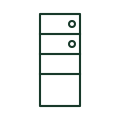
Servers are drawn as a tall rectangle with horizontal bays on network and control system diagrams. Electrical drawings show them in racks with their power feeds, often dual-corded from separate UPS outputs.
On SCADA and building management drawings, the server symbol is tagged with its role, such as historian or HMI server. The power design should show which supply each power supply unit uses. The symbol does not show the software role or redundancy scheme unless tagged.
A switch forwards traffic; a server runs applications and stores data.
These public references support the explanation and provide further detail. Their graphics and downloadable files remain with their publishers.
Public support page for a managed industrial Ethernet switch.
Installation design context for coordinating low-current systems with power and lighting.
This illustration was authored independently by Elora Grid to explain the concept. It is not reproduced from a customer drawing, an official standard graphic or a manufacturer CAD file. Its correspondence to an exact IEC or IEEE symbol identifier has not been certified.
SVG and DXF downloads contain this original artwork. DXF uses unscaled drawing units; a GA envelope supplies no product dimensions, clearances or fabrication information. Original artwork is available under CC BY 4.0. Third-party references retain their own terms.
Elora Grid helps electrical teams work with drawings, specifications and equipment information. Explore the drafting workflow or join the early-access waitlist.