DO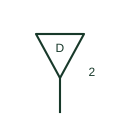
Data outlet plan symbol
Plan symbol for a structured-cabling data outlet, usually tagged with the number of ports and outlet ID.
IEC
Plan and network symbol for a wireless access point, a box or circle with radiating wave arcs.
In plain English
Wireless access points are drawn on plans as a small box or circle with radiating arcs, at ceiling or wall positions, tagged WAP or AP. They are usually powered by PoE through a data outlet, so the plan also shows that outlet.
Coverage is planned by survey or prediction, and the plan symbol locations come from that design. Industrial access points may have external antennas and need weatherproof or rail-rated enclosures. The arcs do not show coverage range or frequency band.
Find the data outlet and PoE source. Check coverage plan. An antenna symbol shows a radiating element; the access point is a complete network device.
Plan and network symbol for a wireless access point, a box or circle with radiating wave arcs. An antenna symbol shows a radiating element; the access point is a complete network device.
Read the source: Industrial WLAN access points, clients and bridges · Industrial PoE Ethernet switches

Wireless access points are drawn on plans as a small box or circle with radiating arcs, at ceiling or wall positions, tagged WAP or AP. They are usually powered by PoE through a data outlet, so the plan also shows that outlet.
Coverage is planned by survey or prediction, and the plan symbol locations come from that design. Industrial access points may have external antennas and need weatherproof or rail-rated enclosures. The arcs do not show coverage range or frequency band.
An antenna symbol shows a radiating element; the access point is a complete network device.
These public references support the explanation and provide further detail. Their graphics and downloadable files remain with their publishers.
Public product family page describing industrial wireless access points, clients and bridges.
Public product family page describing Ethernet switches that power field devices over the data cable.
This illustration was authored independently by Elora Grid to explain the concept. It is not reproduced from a customer drawing, an official standard graphic or a manufacturer CAD file. Its correspondence to an exact IEC or IEEE symbol identifier has not been certified.
SVG and DXF downloads contain this original artwork. DXF uses unscaled drawing units; a GA envelope supplies no product dimensions, clearances or fabrication information. Original artwork is available under CC BY 4.0. Third-party references retain their own terms.
Plan symbol for a structured-cabling data outlet, usually tagged with the number of ports and outlet ID.
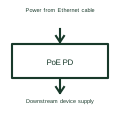
A PoE powered-device interface manages the receiving end of power delivered over a compatible Ethernet link.

General antenna symbol, a vertical line ending in a V or triangle, used on communications and TV distribution drawings.
Elora Grid helps electrical teams work with drawings, specifications and equipment information. Explore the drafting workflow or join the early-access waitlist.