DFR
Disturbance recorder
Recorder that captures analogue waveforms and binary signals before and after a trigger for fault analysis.
SLD / Schematic
Recorder that timestamps changes of state on many binary inputs so the order of operations can be reconstructed.
In plain English
A sequence-of-events recorder monitors breaker auxiliary contacts, protection trip outputs, alarms and other binary signals, and stores each change with an accurate timestamp. After an incident the list shows which device operated first, which is often impossible to tell from alarms alone.
Timestamp resolution and time synchronisation are what make the record useful. The symbol does not show the time source, such as a GPS clock, or the debounce settings on each input, and without synchronisation records from different devices cannot be merged reliably.
Identify the time synchronisation source. Check which contacts are wired as inputs. An SOE recorder logs binary changes in time order; a disturbance recorder captures analogue waveforms.
Recorder that timestamps changes of state on many binary inputs so the order of operations can be reconstructed. An SOE recorder logs binary changes in time order; a disturbance recorder captures analogue waveforms.
Read the source: SEL 2022 Product and Solution Guide: published protection function tables
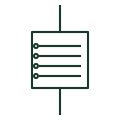
A sequence-of-events recorder monitors breaker auxiliary contacts, protection trip outputs, alarms and other binary signals, and stores each change with an accurate timestamp. After an incident the list shows which device operated first, which is often impossible to tell from alarms alone.
Timestamp resolution and time synchronisation are what make the record useful. The symbol does not show the time source, such as a GPS clock, or the debounce settings on each input, and without synchronisation records from different devices cannot be merged reliably.
An SOE recorder logs binary changes in time order; a disturbance recorder captures analogue waveforms.
These public references support the explanation and provide further detail. Their graphics and downloadable files remain with their publishers.
Public product and function guide including event recording and time synchronisation.
This illustration was authored independently by Elora Grid to explain the concept. It is not reproduced from a customer drawing, an official standard graphic or a manufacturer CAD file. Its correspondence to an exact IEC or IEEE symbol identifier has not been certified.
SVG and DXF downloads contain this original artwork. DXF uses unscaled drawing units; a GA envelope supplies no product dimensions, clearances or fabrication information. Original artwork is available under CC BY 4.0. Third-party references retain their own terms.
Recorder that captures analogue waveforms and binary signals before and after a trigger for fault analysis.
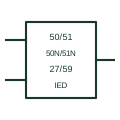
Single relay block on an SLD that lists the protection functions it provides, with CT, VT and trip connections.
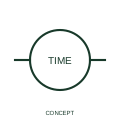
A clock indication identifies a time display or clock function in the circuit documentation.
Elora Grid helps electrical teams work with drawings, specifications and equipment information. Explore the drafting workflow or join the early-access waitlist.