HS-GD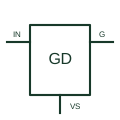
High-side gate driver
Drives a high-side power transistor with the output circuit referenced to its switching node.
Schematic
In plain English
A high-side switch controls the connection between a supply and the high side of a load.
A controller can switch the positive supply path to an attached device using the selected component.
Draw the switch between the positive supply and the load, with the return path shown separately. Identify any diagnostic output as a signal rather than another power connection. The word smart does not define a universal set of protection or diagnostic features.
The location in the circuit differs. A high-side switch controls the supply-side path; a low-side switch controls the return-side path. Their drive and load-reference arrangements must match the selected circuit.
Read the source: High-side power switching
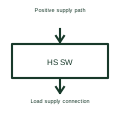
Monitoring and protection features depend on the chosen device, not merely the high-side position.
These public references support the explanation and provide further detail. Their graphics and downloadable files remain with their publishers.
High-side power switching: public technical context for the named function. Product and compliance details remain with the publisher.
This illustration was authored independently by Elora Grid to explain the concept. It is not reproduced from a customer drawing, an official standard graphic or a manufacturer CAD file. Its correspondence to an exact IEC or IEEE symbol identifier has not been certified.
SVG and DXF downloads contain this original artwork. DXF uses unscaled drawing units; a GA envelope supplies no product dimensions, clearances or fabrication information. Original artwork is available under CC BY 4.0. Third-party references retain their own terms.
Drives a high-side power transistor with the output circuit referenced to its switching node.
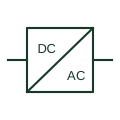
An identified interface converting electrical power between documented circuit forms.

An identified electrical connection point linking schematic and wiring information.
Elora Grid helps electrical teams work with drawings, specifications and equipment information. Explore the drafting workflow or join the early-access waitlist.