S R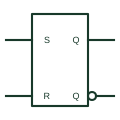
IEC SR latch (rectangular form)
Rectangular IEC bistable with S and R inputs that set or reset the stored state immediately.
IEC
IEC bistable with 1S and 1R inputs that act only under C1 control, giving a synchronous set-reset function.
In plain English
Adding the C1 prefix to S and R makes them synchronous: they act only when C1 is active or on its active transition. The element therefore combines set-reset storage with clocking, which keeps state changes aligned with the rest of a synchronous system.
Clocked SR elements appear in function-block diagrams for PLCs and in state-machine documentation. On hardware schematics the same function is often implemented with a JK or D flip-flop and gating, so cross-reference the implementation.
The symbol needs a stated rule for 1S and 1R active together. Without S or R dependency or a note, that condition is undefined.
IEC bistable with 1S and 1R inputs that act only under C1 control, giving a synchronous set-reset function. The unclocked IEC SR latch acts immediately on S and R.
Read the source: Overview of IEEE Standard 91-1984: explanation of logic symbols (SDYZ001A)
Qualifying-symbol and dependency conventions as explained in TI's public overview of IEEE Std 91-1984, which incorporates IEC 617-12 work. Independent educational drawing; not certified IEC geometry or an IEC database identifier.
Shown as an independently authored educational illustration. Use the cited publication and drawing legend to verify the required drafting form.
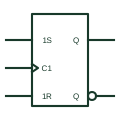
Adding the C1 prefix to S and R makes them synchronous: they act only when C1 is active or on its active transition. The element therefore combines set-reset storage with clocking, which keeps state changes aligned with the rest of a synchronous system.
Clocked SR elements appear in function-block diagrams for PLCs and in state-machine documentation. On hardware schematics the same function is often implemented with a JK or D flip-flop and gating, so cross-reference the implementation.
The symbol needs a stated rule for 1S and 1R active together. Without S or R dependency or a note, that condition is undefined.
The unclocked IEC SR latch acts immediately on S and R.
These public references support the explanation and provide further detail. Their graphics and downloadable files remain with their publishers.
C dependency applied to S and R inputs on bistable elements.
This illustration was authored independently by Elora Grid to explain the concept. It is not reproduced from a customer drawing, an official standard graphic or a manufacturer CAD file. Its correspondence to an exact IEC or IEEE symbol identifier has not been certified.
SVG and DXF downloads contain this original artwork. DXF uses unscaled drawing units; a GA envelope supplies no product dimensions, clearances or fabrication information. Original artwork is available under CC BY 4.0. Third-party references retain their own terms.
Rectangular IEC bistable with S and R inputs that set or reset the stored state immediately.
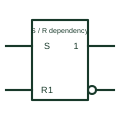
Dependency labels Sm and Rm: the affected output behaves as if set or reset when the affecting input is active.
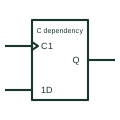
Dependency label Cm on a clock or control input; inputs prefixed with m act only when Cm is active.
Elora Grid helps electrical teams work with drawings, specifications and equipment information. Explore the drafting workflow or join the early-access waitlist.