DYN-NEG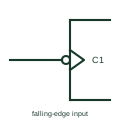
IEC dynamic input with negation (falling edge)
Clock wedge combined with a negation circle or polarity triangle, so the input acts on a falling edge.
IEC
Wedge drawn inside the outline at an input, meaning the input acts on a transition rather than a level.
In plain English
The dynamic input indicator is a small wedge inside the outline at the point where the input line enters. It means the input is active only on a transition, normally from external 0 to 1 in positive logic. It is the mark that distinguishes an edge-triggered flip-flop clock from a level-sensitive latch enable.
On sequential logic drawings the reader should look for the wedge at every C input. A missing wedge on a clock input changes the device from edge-triggered to transparent, which changes timing behaviour significantly.
The wedge does not specify setup or hold time, nor maximum clock rate. Those are device timing parameters. Check the active clock edge against the input waveform and the timing data of the actual logic element.
Wedge drawn inside the outline at an input, meaning the input acts on a transition rather than a level. The postponed-output mark relates to pulse-triggered elements whose output changes at the end of the pulse, not at the edge.
Read the source: Overview of IEEE Standard 91-1984: explanation of logic symbols (SDYZ001A) · SN74HC74 — positive-edge D flip-flops
Qualifying-symbol and dependency conventions as explained in TI's public overview of IEEE Std 91-1984, which incorporates IEC 617-12 work. Independent educational drawing; not certified IEC geometry or an IEC database identifier.
Shown as an independently authored educational illustration. Use the cited publication and drawing legend to verify the required drafting form.
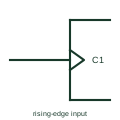
The dynamic input indicator is a small wedge inside the outline at the point where the input line enters. It means the input is active only on a transition, normally from external 0 to 1 in positive logic. It is the mark that distinguishes an edge-triggered flip-flop clock from a level-sensitive latch enable.
On sequential logic drawings the reader should look for the wedge at every C input. A missing wedge on a clock input changes the device from edge-triggered to transparent, which changes timing behaviour significantly.
The wedge does not specify setup or hold time, nor maximum clock rate. Those are device timing parameters. Check the active clock edge against the input waveform and the timing data of the actual logic element.
The postponed-output mark relates to pulse-triggered elements whose output changes at the end of the pulse, not at the edge.
These public references support the explanation and provide further detail. Their graphics and downloadable files remain with their publishers.
Dynamic input indication in positive logic, negative logic and polarity notation.
Edge-triggered flip-flop documentation.
This illustration was authored independently by Elora Grid to explain the concept. It is not reproduced from a customer drawing, an official standard graphic or a manufacturer CAD file. Its correspondence to an exact IEC or IEEE symbol identifier has not been certified.
SVG and DXF downloads contain this original artwork. DXF uses unscaled drawing units; a GA envelope supplies no product dimensions, clearances or fabrication information. Original artwork is available under CC BY 4.0. Third-party references retain their own terms.
Clock wedge combined with a negation circle or polarity triangle, so the input acts on a falling edge.
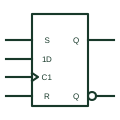
IEC bistable with a dynamic C1 clock and a 1D data input, storing D on the active clock edge.
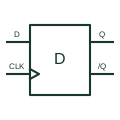
Captures its data input at the documented positive clock edge and retains that digital state.
Elora Grid helps electrical teams work with drawings, specifications and equipment information. Explore the drafting workflow or join the early-access waitlist.